Case Study
Apple Topline
Designing an AI-powered reporting experience that helped teams move from fragmented workflows to faster, more confident decisions

Apple Topline
Dashboard
Apple’s Topline brought fragmented reporting workflows into a more unified, intelligent experience. The goal was not simply to redesign a reporting interface, but to make enterprise data easier to generate, interpret, and trust.
Topline was built to centralize reporting workflows across Apple and make complex data easier to generate, understand, and act on. I led UX from discovery through delivery, shaping the product strategy, core workflows, and system foundations that supported the experience.
Background
Rebuilding trust in complex reporting workflows.
Reporting should help teams make decisions faster, not slow them down. But in practice, enterprise reporting often becomes fragmented, manual, and hard to trust. Before Topline, teams were working across disconnected tools, inconsistent report formats, and workflows that made it difficult to build, validate, and share outputs with confidence.
The friction showed up in several ways. Creating reports could be slow and error-prone. Terminology and structure varied from team to team, reducing comprehension and trust. Power users often relied on workarounds to get the results they needed, but those workarounds could easily break queries or produce unreliable outputs.
So how might we design a reporting experience that helps Apple teams generate, understand, and trust data faster — while making complex workflows feel more guided, scalable, and intelligent?
Direct Contributions
Leading UX from discovery through delivery, with systems thinking built in.
I led UX strategy, research, interaction design, workflow design, and prototyping across the product. I also used AI-assisted research and concepting tools, including ChatGPT, to accelerate synthesis, explore reporting scenarios, pressure-test language, and identify patterns across complex workflow feedback. I built the design system foundations for the experience, creating reusable patterns for dense reporting workflows and partnering closely with product, data, and platform engineering to maintain design-to-code fidelity.
In addition to product design, I helped establish scalable patterns and contribution guidelines so the work could extend beyond a single feature set and support broader internal consistency across tools.
Research
Understanding where reporting friction was slowing teams down.
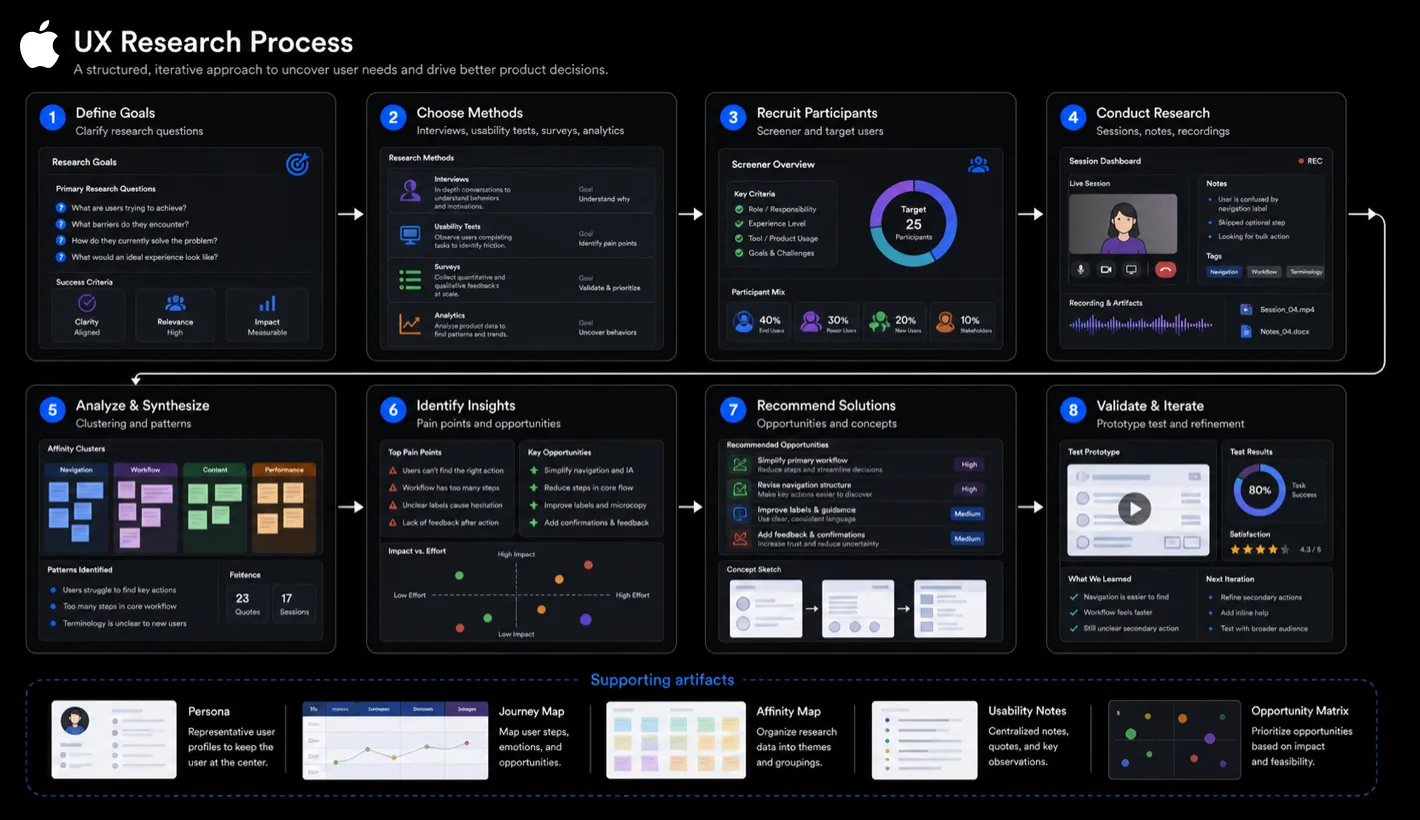
Existing report-creation flow showing where filtering, setup, and system feedback created friction.
I worked across stakeholder interviews, contextual inquiry, workflow mapping, and AI-assisted research synthesis to understand how teams were building reports, where the friction lived, and why trust was breaking down in the experience. Tools such as ChatGPT helped speed up theme clustering, rewrite early research notes into sharper hypotheses, and explore how AI could support query creation without hiding system logic.
That research surfaced a few recurring issues. Query building felt fragile. Filters and sharing workflows created avoidable friction. Similar actions were expressed in inconsistent ways, making the product harder to learn and harder to trust. A heuristic review also exposed problems in hierarchy, labeling, and system feedback, especially in places where users needed clarity most. AI-assisted synthesis made it easier to compare findings across workflows and separate surface-level UI issues from deeper problems in confidence, validation, and data comprehension.
The deeper insight was that the problem was not only about usability. It was also about confidence. If teams could not quickly understand how a report was built, what it meant, or whether it was reliable, the reporting experience became a bottleneck instead of a decision-making tool.
Strategy
Shaping a smarter, more guided reporting model for enterprise teams.
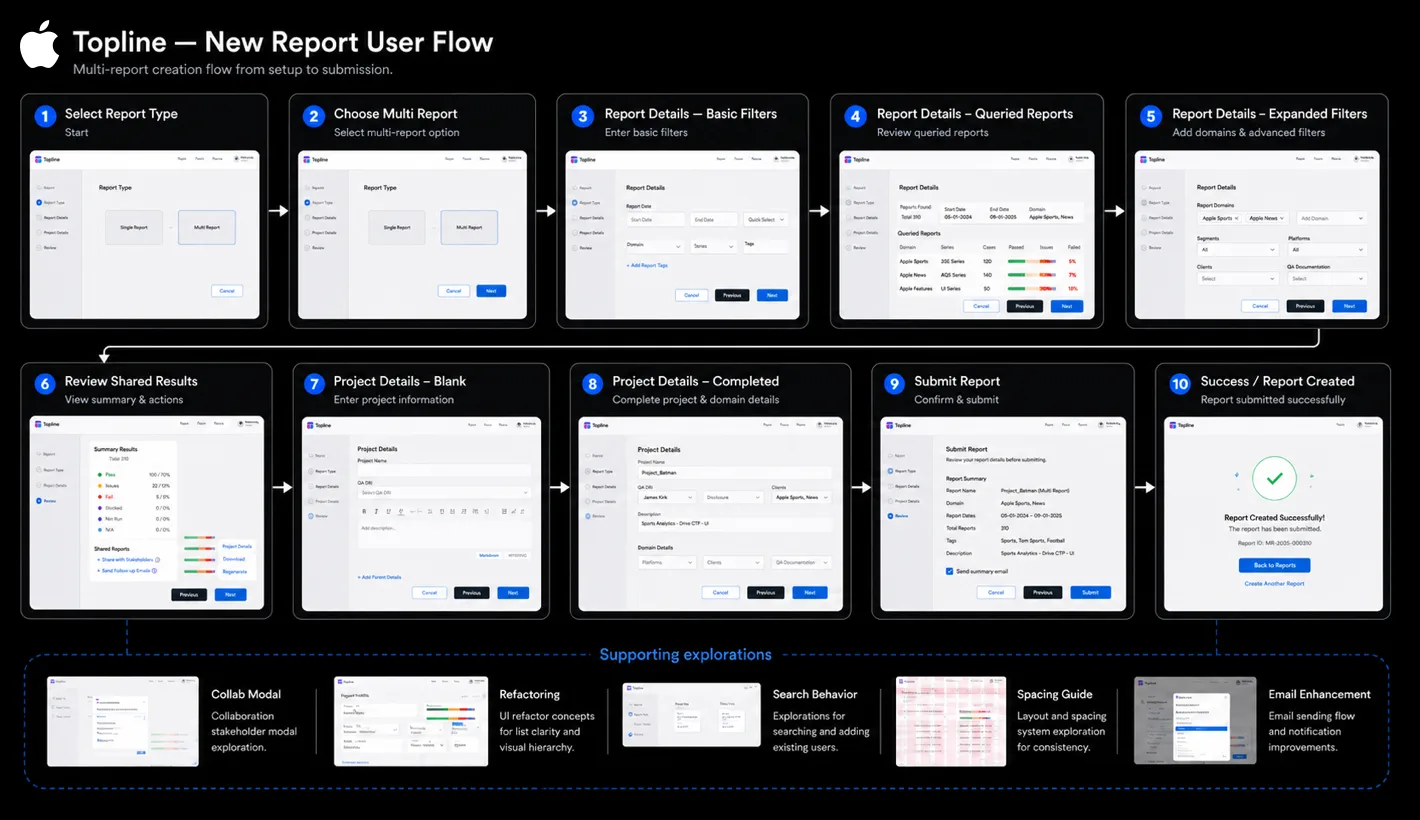
Restructuring the product model and workflow foundations behind Topline.
The product direction focused on making Topline feel more intelligent, more usable, and more scalable for enterprise teams.
A major part of the strategy was introducing AI-assisted query building to help users discover relevant fields, assemble reports more efficiently, and reduce errors before they reached the output stage. I used ChatGPT as part of the research and concepting workflow to explore plain-language prompts, edge-case messaging, field recommendation patterns, and explainability models that could make the feature feel useful without feeling like a black box. Another major track was creating a more modular dashboard model so teams could organize, save, and share information in ways that matched their workflows.
Alongside the product work, I built a centralized design system for charts, tables, filters, alerts, navigation, and empty or error states. This gave the experience stronger consistency and gave internal teams a more scalable foundation to build from.
Solution
A clearer end-to-end flow connected report configuration, Radar data, project context, and ATP summary results in one place.
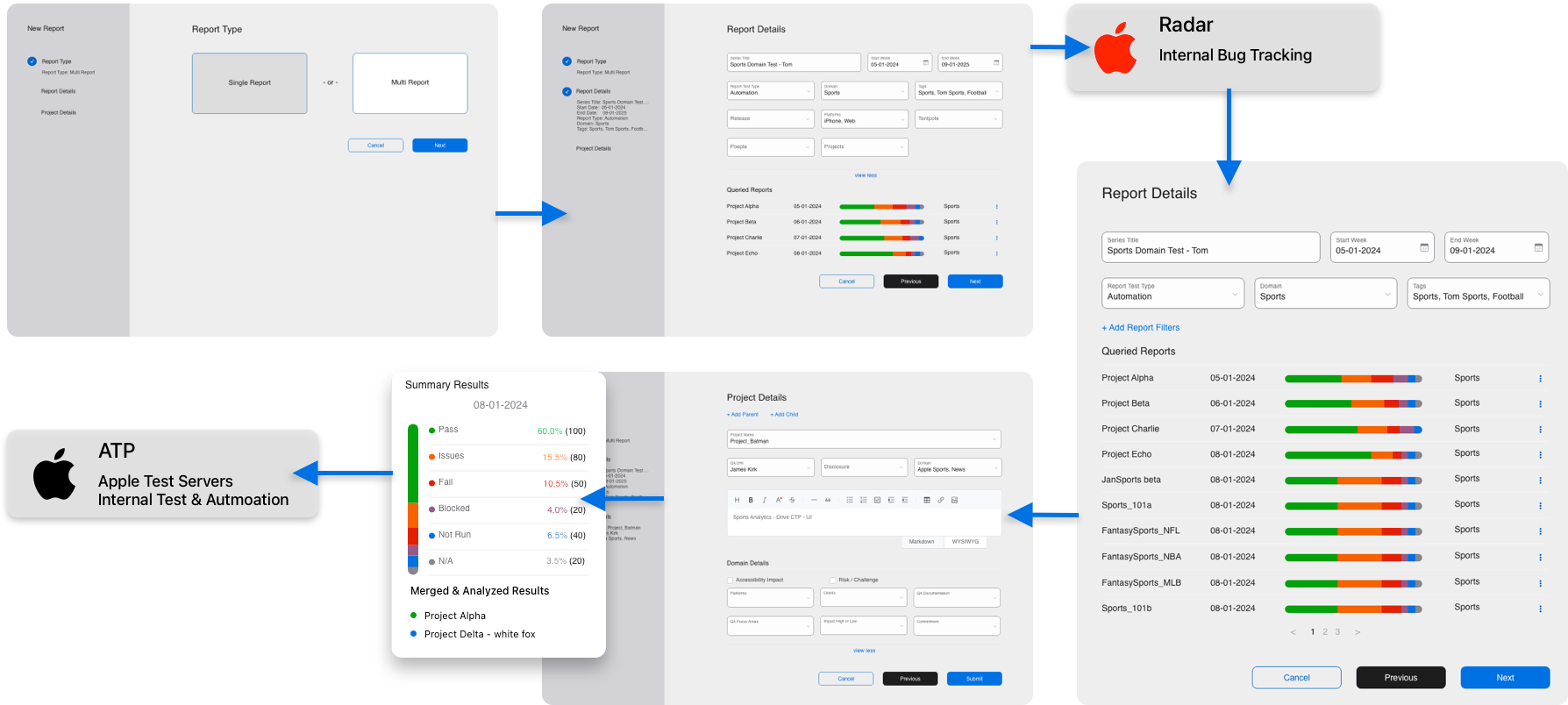
The redesigned workspace brought project context, reporting artifacts, and key metadata into one clearer view.
The redesigned experience centered on a guided Smart Query Builder that made complex report creation feel more approachable without limiting flexibility. The AI direction focused on suggesting fields, clarifying query intent, summarizing report logic, and explaining potential errors in language users could trust. Inline validation, reusable presets, and clearer feedback reduced the need for workaround behavior and helped users move faster with fewer mistakes.
Dashboards became more modular and adaptable, allowing teams to group information more meaningfully, create saved views, and share repeatable templates. Data tables and filters were refined for dense-data readability, with improved hierarchy, facet-based controls, and structural cues that helped users stay oriented while working through complex views.
Supporting features such as alerts, ownership states, rationale tracking, and audit visibility helped strengthen trust in the reporting process. Integration with Radar also added richer context by pulling related bugs and metadata into the workflow, reducing the need to jump between tools.
Design System
Creating the foundations for consistency across dense data products.
A significant part of the work was designing the system beneath the product. I created tokenized foundations for color, typography, spacing, and light and dark parity, then extended those into reusable patterns for enterprise reporting components.
This included components for charts, tables, filters, alerts, navigation, and edge states, along with naming conventions and contribution guidance that made the system easier to scale across internal teams. The result was not just a more coherent product, but a stronger platform foundation for future work.
Impact
Improving speed, trust, and long-term scalability.
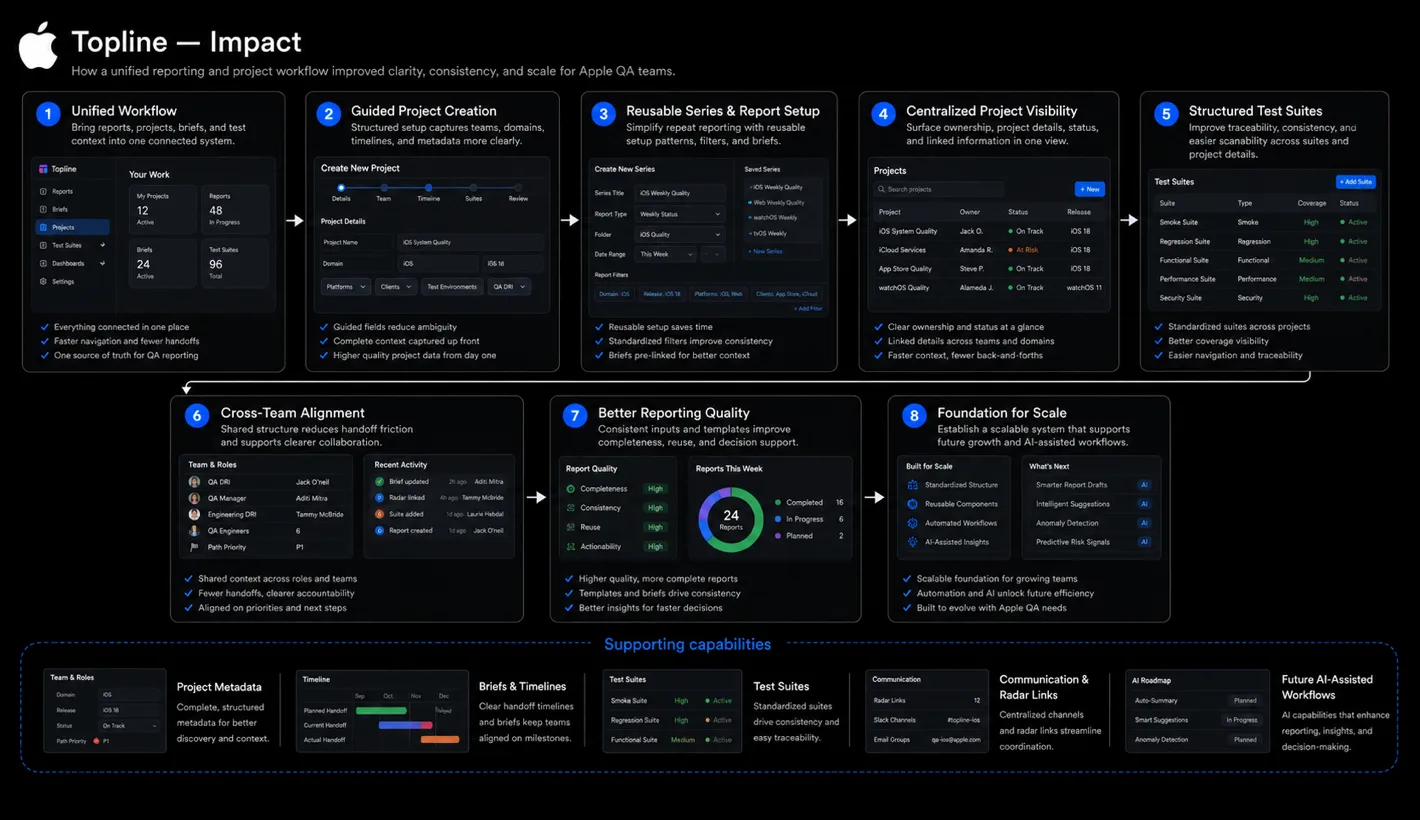
The redesign made report creation faster, reduced friction across the reporting workflow, and made the product easier to understand and trust. Teams were able to move from data to insight with less manual effort and greater confidence in the outputs they were creating.
The work also had impact beyond Topline itself. The design system patterns extended into other internal tools, helping accelerate future delivery and improve consistency across Apple’s broader internal ecosystem.
Takeaways
What this project reinforced about designing enterprise AI products.
01
In enterprise products, speed matters — but confidence matters just as much. If users cannot trust what they are seeing, usability alone is not enough.
02
AI assistance works best when it reduces cognitive load without hiding system logic. Guidance, validation, and transparency were essential to making the experience feel reliable.
03
Design systems create the most value when they support real workflow complexity. In Topline, the system helped scale both the product and the team behind it.
Partners: Product Management, Data Engineering, Platform Engineering, and QA
Tools: Figma, FigJam, ChatGPT, Radar, AI-assisted research synthesis, and internal prototyping tools