Solo Passion Project / AI Prototype
AI Enterprise UX Intelligence
Designing and building a human-in-the-loop AI workflow that turns messy enterprise signals into priority, ownership, confidence, and handoff-ready action.
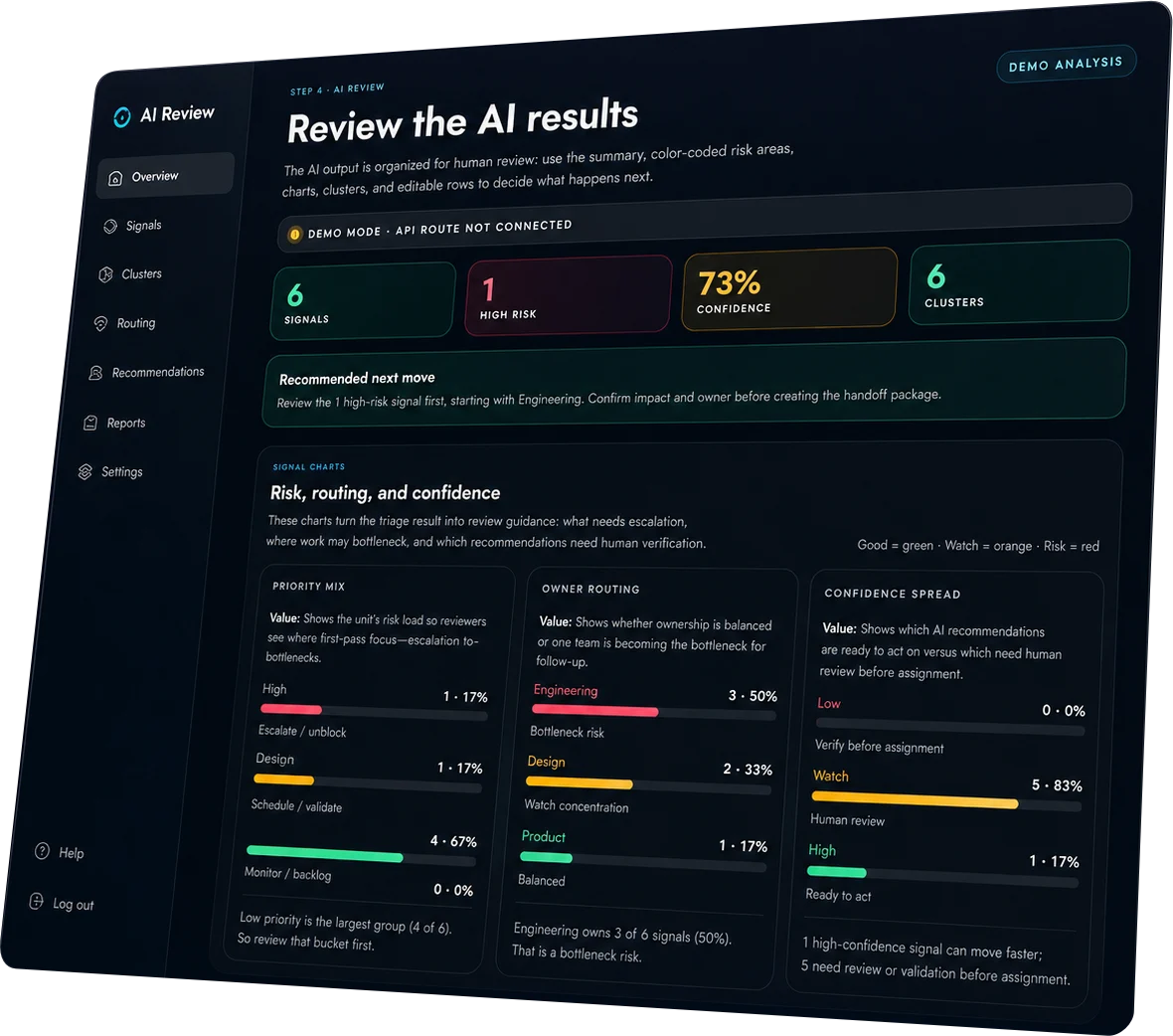

AI Enterprise UX Intelligence

AI Entperise
AI NCC-1701-alpha is a solo enterprise AI prototype I designed and built as a passion project. It explores how AI can help product, design, engineering, support, and operations teams make sense of messy incoming signals: notes, tickets, source URLs, uploaded context, and enterprise workflow issues.
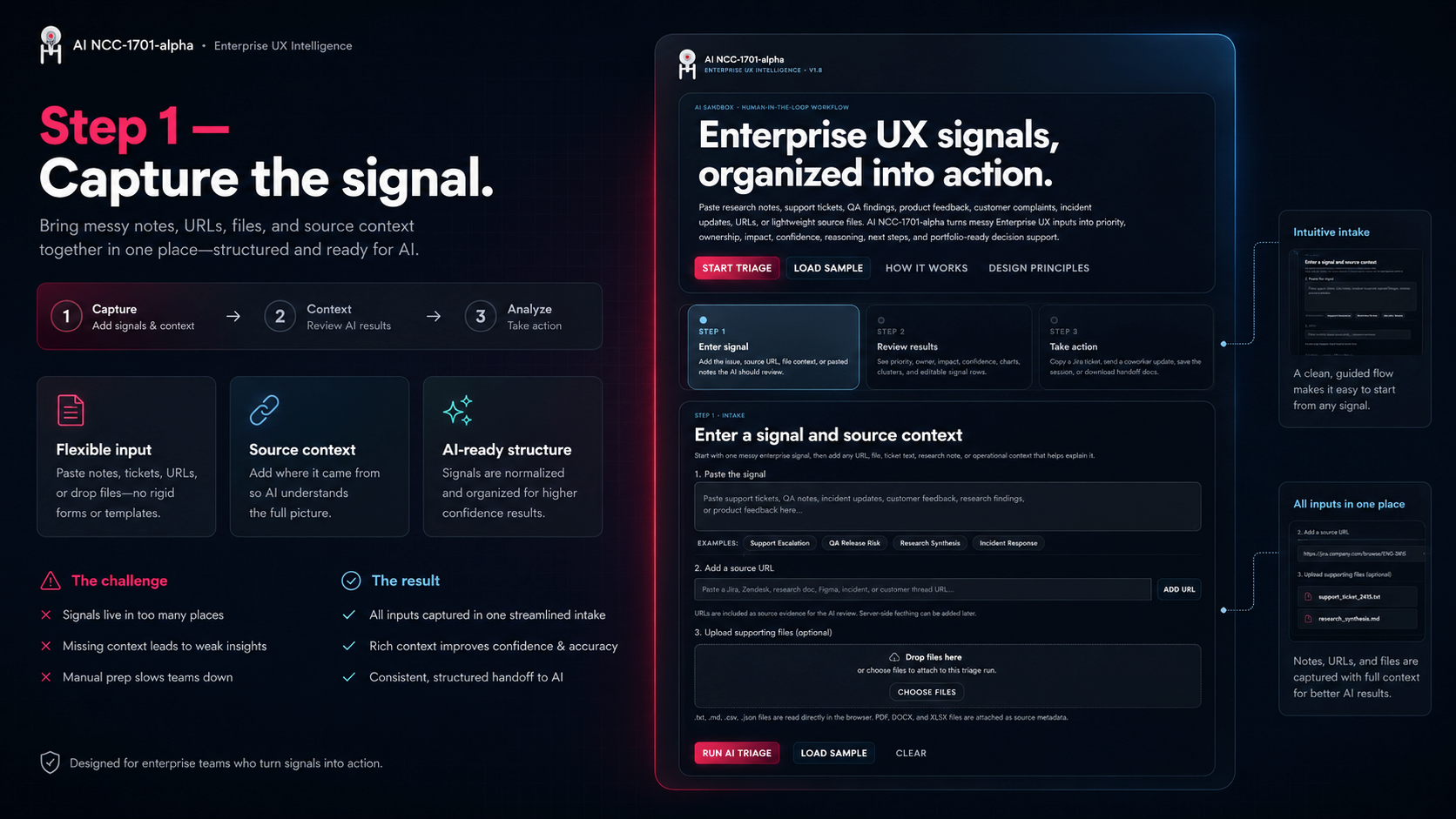
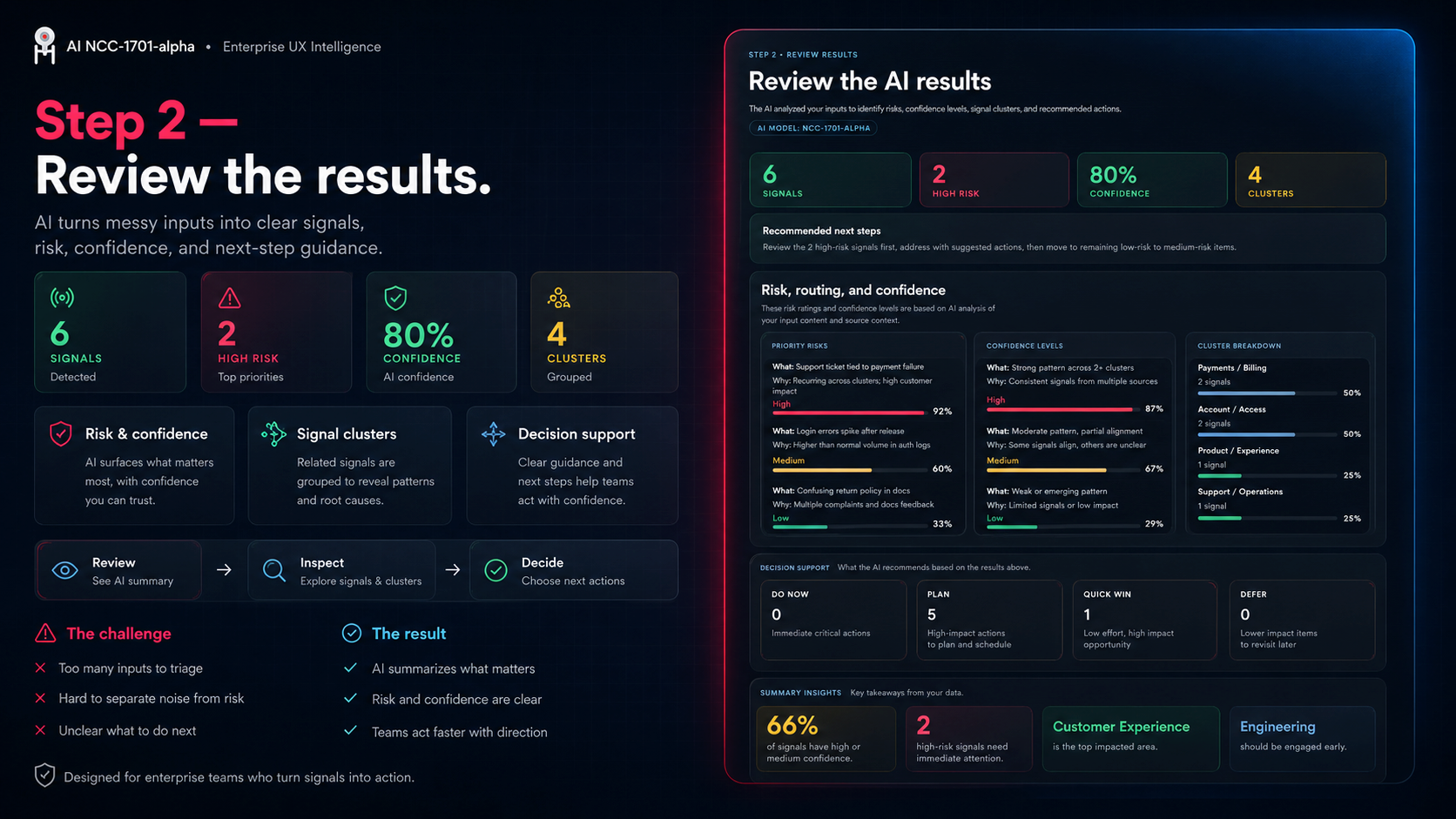
I organized the product around a structured review workflow: Enter Signal, Review Results, and Take Action. The goal is not to let AI make the final decision. The goal is to give a human reviewer a faster way to triage, validate, assign, and communicate what should happen next.
Background
A solo product exploration of enterprise signal triage.
Enterprise teams often collect a huge amount of product feedback and operational context, but the signals are scattered across support tickets, stakeholder notes, research findings, analytics comments, and one-off requests. The work is not just reading everything. It is deciding what matters, who owns it, how risky it is, and what action should happen next.
I used this passion project to explore how AI can support that workflow while keeping the human reviewer in control. Every recommendation is framed as something to review, validate, override, or turn into a handoff artifact.
Problem
Product signals are easy to collect, but hard to turn into action.
- Important issues get buried when teams review raw notes, tickets, files, and URLs manually
- Ownership is unclear when a signal could belong to design, product, engineering, support, or operations
- Risk and confidence are mixed together, making it hard to know what needs escalation versus validation
- Handoff work is repetitive when every email, Jira ticket, executive summary, or Slack update has to be rewritten from scratch
The core problem was workflow translation: moving from unstructured input to clear priority, reviewable reasoning, and usable next steps without removing human judgment.
Discovery
Designing around how reviewers actually make decisions.
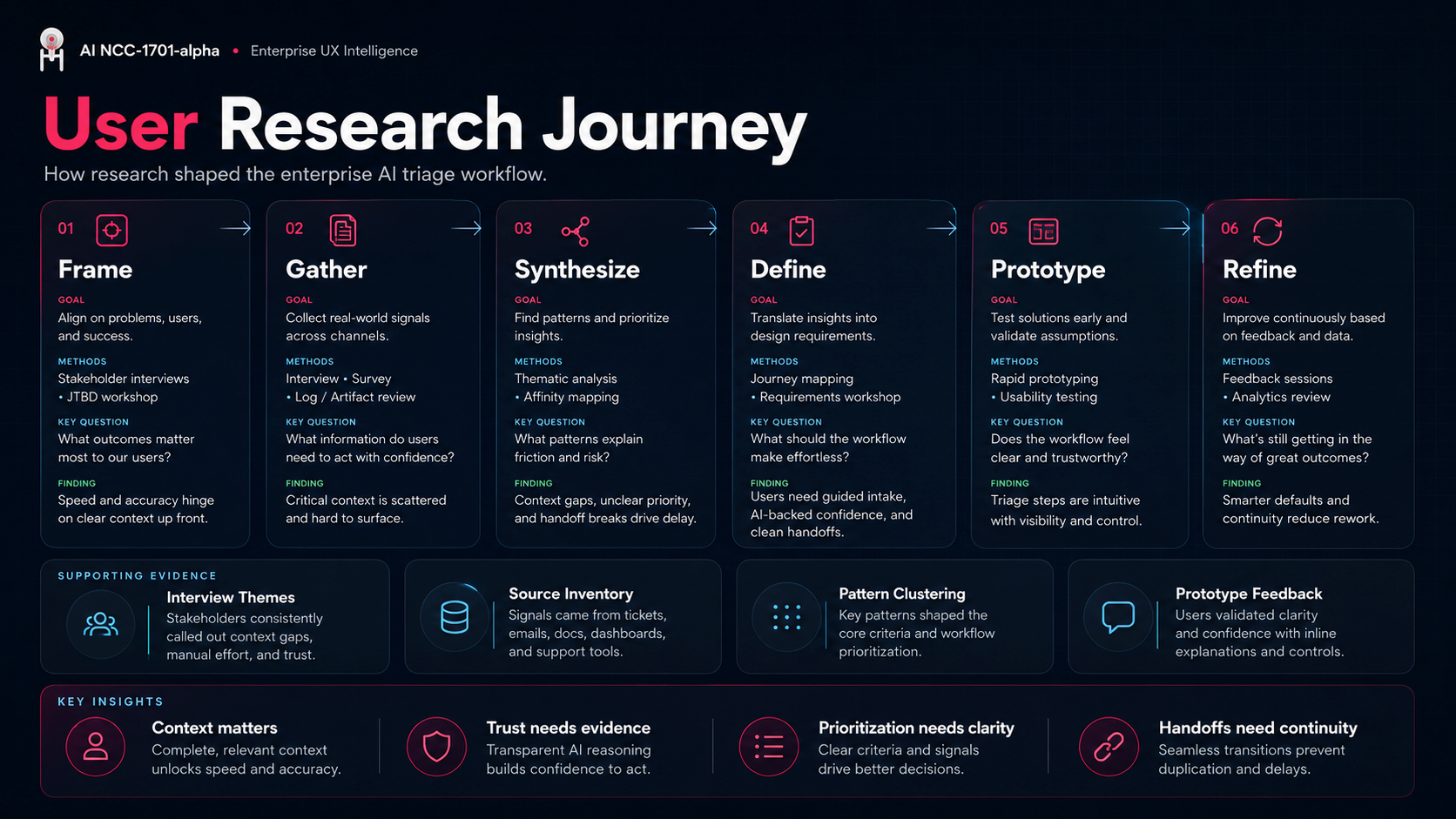
I structured the interface around a practical review loop: understand the signal, inspect the AI recommendation, check the evidence, adjust the outcome, and create the right follow-up artifact. The product needed to feel like an enterprise decision workspace, not a generic chatbot response.
- Separated AI review from human action so recommendations remain inspectable
- Created visible states for priority, owner routing, confidence, and review readiness
- Grouped signals into clusters so duplicate or related issues could be handled together
- Added review and override patterns so the tool supports auditability instead of hiding the decision trail
The main insight was that confidence matters as much as priority. A high-priority signal still needs review if the evidence is weak, the source is unclear, or ownership is concentrated in one overloaded team.
Strategy
Keep AI fast, but keep the reviewer in control.
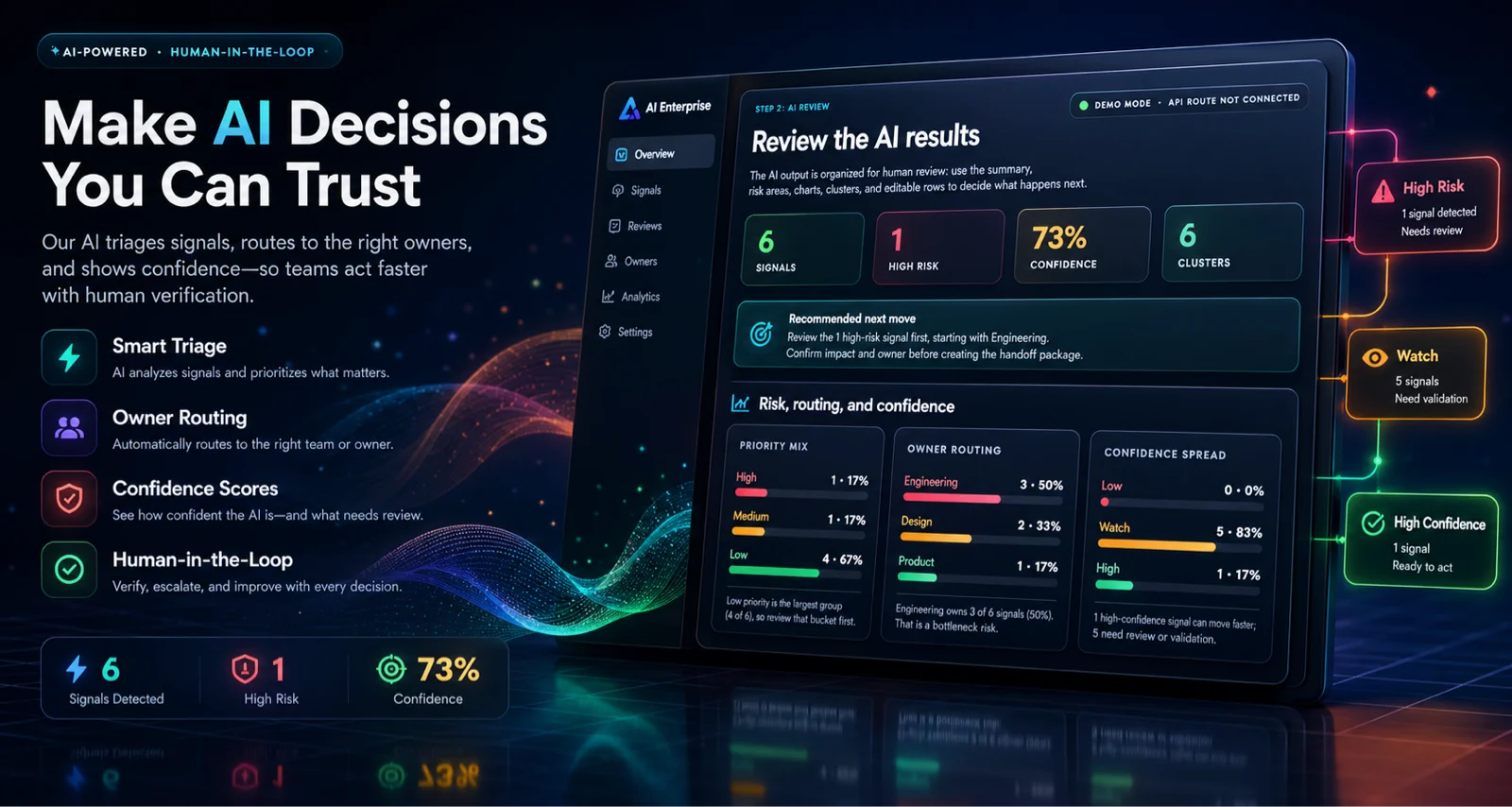
The product strategy was to make the AI output useful as a decision accelerator, not an invisible authority. I designed the workflow to give reviewers a structured path from intake to evaluation to handoff, with validation points at every major step.
- Use AI to create a first-pass read of messy product context
- Expose why a signal was routed, prioritized, clustered, or flagged
- Make uncertainty visible through confidence scores and evidence coverage
- Convert reviewed decisions into communication-ready outputs
Solution
A three-step workflow from signal intake to action.
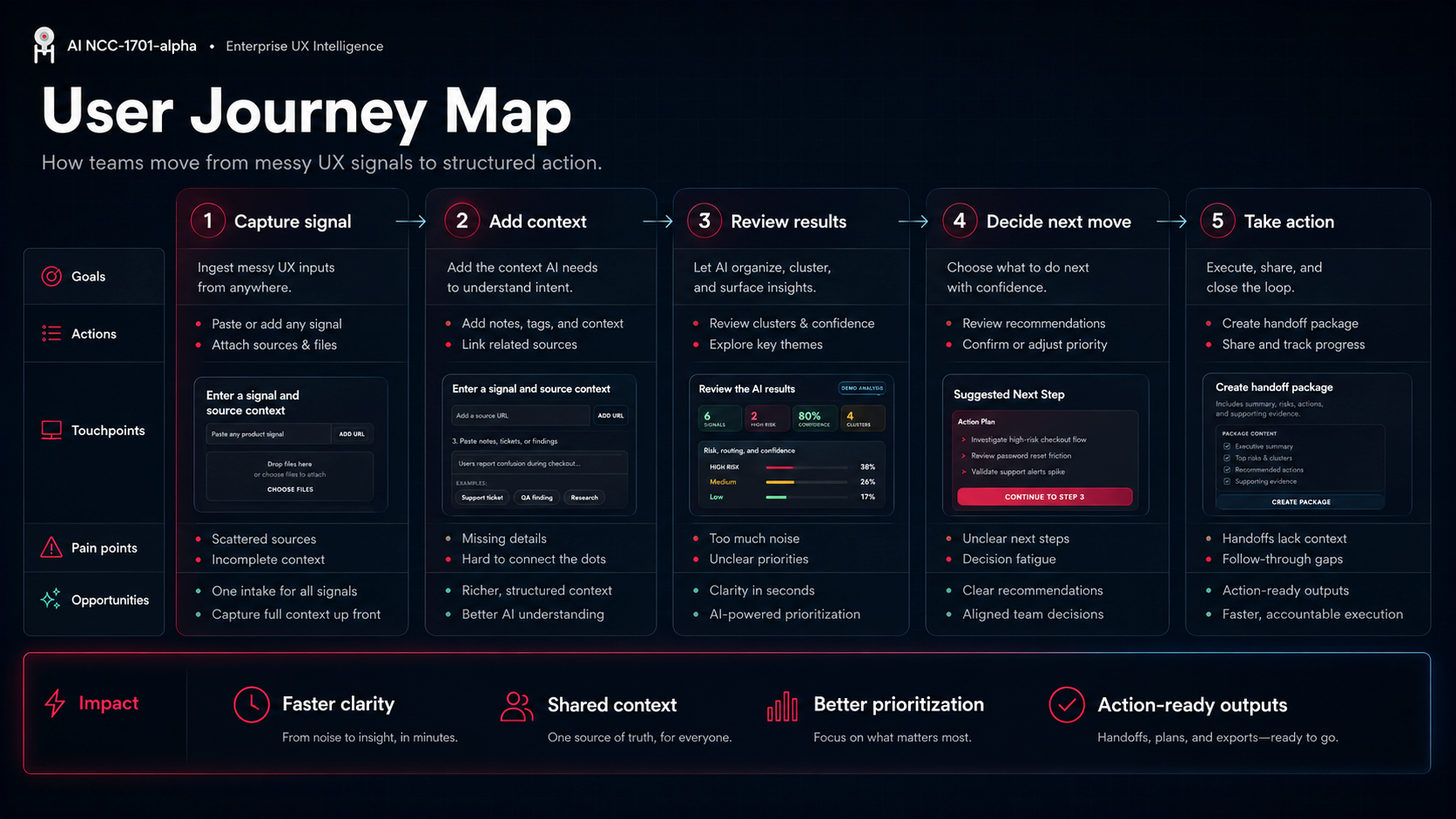
The prototype is organized into three clear steps: Enter Signal, Review Results, and Take Action. Each step is gated so the user always understands where they are, what has been analyzed, and what can be done next.
- Step 1: add a URL, upload supporting files, or paste notes/tickets/findings
- Step 2: review priority, owner, impact, confidence, charts, clusters, and editable signal rows
- Step 3: generate email briefs, Jira tickets, team updates, executive summaries, saved signals, and handoff packages
- Support fallback demo behavior when a live API route is unavailable
Pattern Detection
Helping teams see duplicate groups, shared themes, and where the signal is coming from.
Signal clusters help reviewers avoid treating every issue as a separate one-off. Related requests, failures, support comments, and product gaps are grouped together so teams can see where multiple signals point to the same workflow problem.
- Grouped related issues into signal clusters with shared labels and confidence context
- Flagged possible duplicate groups so repeated pain points become easier to prioritize
- Connected clusters back to source snippets and recommended review actions
- Balanced summary-level scanning with the ability to inspect individual signal rows
UX Signal Table
Editable rows for priority, ownership, impact, status, clusters, and details.
The table turns the AI output into a working surface. Reviewers can scan the strongest signals, filter by priority or owner, change status, and move between table and board-style review without leaving the workflow.
- Table View supports detailed editing and validation
- Board View supports workflow-state review and handoff planning
- Signal rows keep the source, risk, owner, impact, cluster, and status visible
- Human edits and override notes support a clearer review trail
Operational Layer
Moving from analysis into release readiness, roadmap decisions, and audience-specific handoff.
The later prototype rounds add an operational decision layer on top of the original triage flow. The product does not stop at analysis. It helps teams decide what needs escalation, what can wait, who needs to be informed, and whether release movement is safe.
- SLA watchlist for same-day, 24-hour, validate, and next-cycle follow-up
- Evidence coverage showing strong, moderate, weak, and metadata-only source support
- Release risk gate for blocked, needs review, or clear-with-monitoring states
- Roadmap candidates grouped by do now, quick win, plan, and defer
- Audience-specific briefs for executive, product, engineering, support, and design readers
Impact
A clearer path from messy input to reviewed action.
- Created a three-step AI workflow that keeps intake, review, and handoff separated and understandable
- Improved review clarity through priority mix, owner routing, confidence spread, and recommended next move patterns
- Added human review affordances including editable rows, override notes, decision log concepts, and saved-signal states
- Converted reviewed outputs into usable artifacts: email briefs, Jira tickets, team updates, executive summaries, and handoff packages
My Role
Designing the product concept, interaction model, UI system, and prototype workflow.
- Defined the end-to-end product workflow from source intake to AI review to handoff action
- Designed the AI Review, Signal Charts, Decision Workspace, Pattern Detection, and UX Signal Table experiences
- Created interaction patterns for confidence, risk, owner routing, review states, and saved sessions
- Built a working front-end prototype with fallback behavior for portfolio review and live API route support for server-side AI analysis
Project Type: Solo passion project — product concept, UX strategy, UI design, front-end prototype, and AI workflow design
Tools: HTML, CSS, JavaScript, PHP API route, AI-assisted product prototyping